跳转到主要内容

在 PostgreSQL 中使用 ColBERT 重排序为向量检索加速

传统的向量检索通常使用句向量来定位相似内容,而结合 VectorChord 与 ColBERT 词元级多向量晚期交互重排序,可兼顾检索速度与细粒度精度。

传统的向量检索方法通常采用句级别嵌入(Sentence Embeddings)来查找相似内容。然而,通过对词元嵌入(Token Embeddings)进行池化(Pooling)来生成句嵌入,可能会损失词元层级中蕴含的细粒度信息。ColBERT 通过将文本表示为词元级的多向量(Multi-vectors)而非单个聚合向量,有效克服了这一缺陷。这种方法利用词元级的上下文晚期交互(Contextual Late Interaction),使 ColBERT 能够比仅依赖句嵌入的方法保留更丰富的细微语义信息,从而显著提高检索精度。

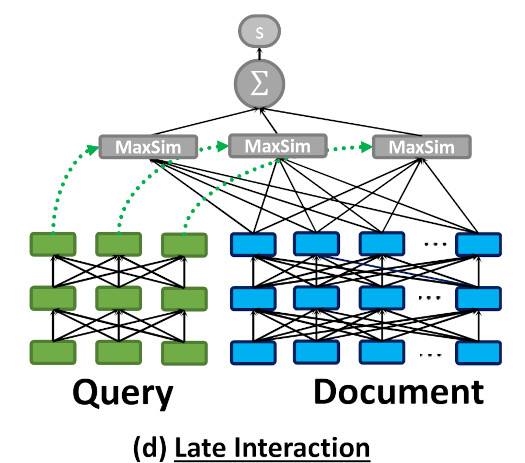
ColBERT structure (from the original paper)

如上图所示,ColBERT 会将每篇文档和每个查询编码为一组词元向量列表,并在查询时计算最大相似度(MaxSim)。

词元级的晚期交互需要消耗更多的计算资源和存储空间。这使得在大规模数据集上直接使用 ColBERT 检索充满挑战,尤其是在对低延迟有严格要求的场景下。

一种行之有效的解决方案是将句级别的向量检索与词元级的晚期交互重排序相结合——这样既能利用近似向量检索的高效性,又能兼顾多向量相似性检索的高质量。

此外,多向量方法并不仅限于纯文本检索任务,它同样适用于视觉文档理解。在多模态检索模型领域,诸如 ColPali 和 ColQwen 等前沿模型能够直接将文档图像编码为多向量表示,展现出比传统“OCR 转文本”方案更强大的性能。

本文将演示如何结合使用 PostgreSQL 扩展 VectorChord、pgvector 以及 ColBERT 重排序技术。

实战教程

假设我们已经准备好了文档数据,首先创建一张表来存储所有文档:

import psycopg
from pgvector.psycopg import register_vector

class PgClient:
    def __init__(self, url: str, dataset: str, sentence_emb_dim: int, token_emb_dim: int):
        self.dataset = dataset
        self.sentence_emb_dim = sentence_emb_dim
        self.token_emb_dim = token_emb_dim
        self.conn = psycopg.connect(url, autocommit=True)
        with self.conn.cursor() as cursor:
            cursor.execute("CREATE EXTENSION IF NOT EXISTS vchord CASCADE;")
        register_vector(self.conn)

    def create(self):
        with self.conn.cursor() as cursor:
            cursor.execute(
                f"CREATE TABLE IF NOT EXISTS {self.dataset}_corpus "
                "(id INT BY DEFAULT AS IDENTITY PRIMARY KEY, text TEXT, "
                f"emb vector({self.sentence_emb_dim}), embs vector({self.token_emb_dim})[]);"
            )

在这里,我们创建了一张同时包含句级别嵌入(emb)和词元级别嵌入数组(embs)的表。

市面上有许多嵌入 API 和开源模型,您可以根据实际业务场景选择合适的句向量模型。

对于词元级嵌入,我们使用 ColBERT 进行编码:

from colbert.infra import ColBERTConfig
from colbert.modeling.checkpoint import Checkpoint

class TokenEncoder:
    def __init__(self):
        self.config = ColBERTConfig(doc_maxlen=220, query_maxlen=32)
        self.checkpoint = Checkpoint(
            "colbert-ir/colbertv2.0", colbert_config=self.config, verbose=0
        )

    def encode_doc(self, doc: str):
        return self.checkpoint.docFromText([doc], keep_dims=False)[0].numpy()

    def encode_query(self, query: str):
        return self.checkpoint.queryFromText([query])[0].numpy()

ColBERT 模型默认生成 128 维的向量。

插入数据的代码如下:

class PgClient:
    ...
    def insert(self, documents: list[str]):
        with self.conn.cursor() as cursor:
            for doc in tqdm(documents):
                sentence_emb = sentence_encoder.encode_doc(doc)
                token_embs = [emb for emb in token_encoder.encode(doc)]
                cursor.execute(
                    f"INSERT INTO {self.dataset}_corpus (text, emb, embs) VALUES (%s, %s, %s)"
                    (doc, sentence_emb, token_embs)
                )

在向量检索部分,我们可以使用 VectorChord 构建高性能的 RaBitQ 索引:

class PgClient:
    ...
    def index(self, num_doc: int, workers: int):
        n_cluster = 1 << math.ceil(math.log2(num_doc ** 0.5 * 4))
        config = f"""
        residual_quantization = true
        [build.internal]
        lists = [{n_cluster}]
        build_threads = {workers}
        spherical_centroids = false
        """
        with self.conn.cursor() as cursor:
            cursor.execute(f"SET max_parallel_maintenance_workers TO {workers}")
            cursor.execute(f"SET max_parallel_workers TO {workers}")
            cursor.execute(
                f"CREATE INDEX {self.dataset}_rabitq ON {self.dataset}_corpus USING "
                f"vchordrq (emb vector_l2_ops) WITH (options = $${config}$$)"
            )

为了加快索引构建速度,我们可以利用外部质心构建功能。更多详情请参阅《VectorChord 外部质心构建的优势与操作步骤》。

现在,我们可以在 PostgreSQL 中执行初步向量查询:

class PgClient:
    ...
    def query(self, doc: str, topk: int):
        sentence_emb = sentence_encoder.encode_query(doc)
        with self.conn.cursor() as cursor:
            cursor.execute(
                f"SELECT id, text FROM {self.dataset}_corpus ORDER BY emb <-> %s LIMIT {topk}"
            )
            res = cursor.fetchall()
        return res

为了支持 MaxSim 重排序,我们需要在数据库中创建一个自定义函数:

class PgClient:
    def __init__(self, url: str, dataset: str, sentence_emb_dim: int, token_emb_dim: int):
        ...
        self.conn.execute("""
            CREATE OR REPLACE FUNCTION max_sim(document vector[], query vector[]) RETURNS double precision AS $$
            WITH queries AS (
                SELECT row_number() OVER () AS query_number, * FROM (SELECT unnest(query) AS query)
            ),
            documents AS (
                SELECT unnest(document) AS document
            ),
            similarities AS (
                SELECT query_number, document <=> query AS similarity FROM queries CROSS JOIN documents
            ),
            max_similarities AS (
                SELECT MAX(similarity) AS max_similarity FROM similarities GROUP BY query_number
            )
            SELECT SUM(max_similarity) FROM max_similarities
            $$ LANGUAGE SQL
        """)

接下来,我们就可以对向量检索召回的候选文档进行重排序了:

class PgClient:
    def rerank(self, query: str, ids: list[int], topk: int):
        token_embs = [emb for emb in token_encoder.encode_query(query)]
        with self.conn.cursor() as cursor:
            cursor.execute(
                f"SELECT id, text FROM {self.dataset}_corpus WHERE id = ANY(%s) ORDER BY "
                f"max_sim(embs, %s) DESC LIMIT {topk}"
                (ids, token_embs)
            )
            res = cursor.fetchall()
        return res

评估结果

我们在多个 BEIR 数据集上测试了该方法,结果如下:

数据集 初始检索 NDCG@10 重排序后 NDCG@10
fiqa 0.23211 0.3033
quora 0.31599 0.3934

结果表明,ColBERT 重排序能够显著提升向量检索的结果质量。

所有相关的基准测试代码均可在此处获取。

未来规划

将向量检索、全文检索与 ColBERT 重排序相结合,可以进一步提升整体检索性能。我们目前也在积极开发 PostgreSQL BM25 扩展,敬请期待。

参考资料