# 超越纯文本:使用 Modal 与 VectorChord 在 PostgreSQL 中实现免 OCR RAG
> 结合 ColQwen2 视觉语言模型、VectorChord 多向量检索与 Modal 无服务器 GPU,直接在 PostgreSQL 中构建免 OCR 的多模态 RAG 系统。
---
LLMS 索引: [llms.txt](/zh/llms.txt)
---
为复杂文档构建高效的检索增强生成(RAG)系统,往往让人感觉像是在与混乱而繁琐的数据流水线搏斗。尤其是在处理 PDF 或扫描图像时,传统方法高度依赖光学字符识别(OCR)和版面分析。这些步骤不仅速度缓慢、容易出错,而且常常会丢失表格、图表和排版格式等至关重要的视觉上下文信息。**但是,如果您可以直接根据文档的*视觉外观*(而不仅仅是提取出的纯文本)来检索文档,会怎样呢?**
本文将手把手指导您直接在熟悉的 PostgreSQL 数据库中构建这样一套**免 OCR 的 RAG 系统**。我们将结合 **ColQwen2** 视觉语言模型的强大理解能力、**VectorChord** 在 Postgres 中的高效多向量检索能力,以及 **Modal** 用于 GPU 加速嵌入生成的弹性扩展能力。准备好简化您的 RAG 技术栈,在免去复杂预处理的同时大幅提升检索准确率吧!
本文将涵盖以下内容:
* 什么是 ColQwen2,以及为什么它会带来颠覆性变革。
* VectorChord 如何在 Postgres 中实现高级多向量检索。
* 从零构建并评估该系统的分步实战教程。
## 什么是 ColQwen2?视觉理解的强大力量 {#what-is-colqwen2-the-power-of-visual-understanding}
要理解 ColQwen2,我们首先需要了解它的基石:**ColPali**。正如论文《[**ColPali: Efficient Document Retrieval with Vision Language Models**](https://arxiv.org/abs/2407.01449)》中所介绍的,ColPali 提出了一种利用视觉语言模型(VLM)的全新文档检索范式。它不再依赖充满缺陷的 OCR,而是直接利用文档丰富的**视觉特征**(包括文本、图像、表格、版面布局等肉眼可见的一切信息)来建立索引。
不妨回想一下传统 OCR 的局限性:复杂的排版被拆得支离破碎,表格变成一堆乱码,而图像往往被完全忽略。这就好比试图仅凭一份漏洞百出的速记稿去理解整本书。ColPali 则另辟蹊径,使用强大的 VLM(最初基于 PaliGemma)直接生成能够捕捉文档整体视觉特征的嵌入向量。其核心优势源于两大关键设计:
1. **融合上下文的视觉嵌入(Contextualized Vision Embeddings):** 使用 VLM 直接从文档页面图像生成信息丰富的嵌入向量。
2. **晚期交互(Late Interaction):** 这一巧妙的技术允许*查询*的文本语义在*检索时*直接与*文档*的细粒度视觉特征进行交互。它不再仅仅是匹配文本摘要,而是将查询概念与文档页面内的视觉证据进行直接比对。
 > *ColPali 架构图(图片引自 ColPali 论文)*
**ColQwen2** 建立在这一强大的 ColPali 架构之上,并将底层 VLM 替换为了更新的 **Qwen2-VL-2B** 模型。它能够生成 [**ColBERT** 风格](https://arxiv.org/abs/2004.12832)的多向量表示,同时从文本和图像中捕捉细粒度细节。正如在 [**vidore-leaderboard**](https://huggingface.co/spaces/vidore/vidore-leaderboard) 榜单上所展示的那样,ColQwen2 以实用的模型体积实现了令人惊艳的检索表现。
## VectorChord 如何在 Postgres 中赋能 ColQwen2? {#how-does-vectorchord-enable-colqwen2-in-postgres}
这正是 **VectorChord** 发挥关键作用的地方——它将这一前沿的 VLM 能力无缝引入您的 PostgreSQL 数据库。ColQwen2(以及 ColPali)高度依赖**多向量表示(Multi-vector Representations)**和**晚期交互(Late Interaction)**机制,尤其需要高效的 **MaxSim(最大相似度)**运算支持。
计算 MaxSim(即找出查询向量集合中任意向量与文档向量集合中任意向量之间的最高相似度得分并求和)在计算上极其繁重,当面对数百万个文档向量时更是如此。VectorChord 正面攻克了这一难题:
* **原生多向量支持:** 从底层架构设计上便支持在 Postgres 内部高效处理多向量数据。
* **深度优化的 MaxSim:** 借鉴 [**WARP 论文**](https://arxiv.org/abs/2501.17788)的思想,VectorChord 采用动态相似度插补(Dynamic Similarity Imputation)等技术大幅加速 MaxSim 计算,使大规模视觉文档检索成为可能。
* **支持混合检索:** 除了多向量检索外,它还支持稠密向量、稀疏向量及混合检索(欢迎参阅我们的[**往期博文**](/zh/blog/post/hybrid-search-with-postgres-native-bm25-and-vectorchord/)!)。
* **可扩展且磁盘友好:** 专为高性能检索而设计,无需消耗高昂的内存资源。
简而言之,VectorChord 将 PostgreSQL 打造成了一个能够轻松驾驭 ColQwen2 或 ColPali 等模型所需高级向量检索技术的强大引擎。
## 教程:构建您的免 OCR RAG 系统 {#tutorial-building-your-ocr-free-rag-system}
理论介绍完毕,现在让我们挽起袖子动手构建这套系统!我们将逐步完成环境配置、使用 Modal 进行可扩展的嵌入生成、在 Postgres 中通过 VectorChord 建立索引,最后对我们全新的免 OCR RAG 系统进行评估。
### 前置条件 {#prerequisites}
在开始之前,请确保您已准备好:
* 一个安装了 VectorChord 扩展的 PostgreSQL 实例(推荐使用 Docker),或者一个 [**VectorChord Cloud**](/zh/cloud/) 集群。
* 一个 [**Modal**](https://modal.com/) 账号(提供免费额度)。Modal 快速的 GPU 调配与弹性扩缩容能力非常适合嵌入生成阶段。为了使用 ColQwen2 模型高效处理海量文档,充分利用 Modal 的快速启动和 GPU 扩展特性至关重要,这将大幅缩短本地处理所需的时间。
如果您希望快速复现本教程,可以使用 `tensorchord/vchord-suite` 镜像来运行由 TensorChord 提供的多个扩展。
您可以运行以下命令来启动包含 VectorChord-BM25 与 VectorChord 的 Postgres 容器:
```bash
docker run \
--name vchord-suite \
-e POSTGRES_PASSWORD=postgres \
-p 5432:5432 \
-d tensorchord/vchord-suite:pg17-latest
```
```SQL
CREATE EXTENSION IF NOT EXISTS vchord CASCADE;
CREATE EXTENSION IF NOT EXISTS pg_tokenizer CASCADE;
CREATE EXTENSION IF NOT EXISTS vchord_bm25 CASCADE;
\dx
pg_tokenizer | 0.1.0 | tokenizer_catalog | pg_tokenizer
vchord | 0.3.0 | public | vchord: Vector database plugin for Postgres, written in Rust, specifically designed for LLM
vchord_bm25 | 0.2.0 | bm25_catalog | vchord_bm25: A postgresql extension for bm25 ranking algorithm
vector | 0.8.0 | public | vector data type and ivfflat and hnsw access methods
```
配置 Modal:
```bash
$ pip install modal
$ python3 -m modal setup # 点击链接完成授权
```
### 步骤 1:加载数据(使用 Modal Volume) {#step-1-load-the-data-using-modal-volumes}
我们将使用 [**ViDoRe Benchmark**](https://huggingface.co/collections/vidore/vidore-benchmark-667173f98e70a1c0fa4db00d) 数据集。为了在可能分布式运行的 Modal 函数之间高效共享这些数据,我们将其下载到一个 [**Modal Volume**](https://modal.com/docs/guide/volumes) 中。Volume 提供了持久化的共享存储,非常适合这种“一次下载,多次处理”的场景。
```python
image = modal.Image.debian_slim().pip_install("datasets","huggingface_hub","Pillow")
DATASET_DIR = "/data"
DATASET_VOLUME = modal.Volume.from_name(
"colpali-dataset", create_if_missing=True
)
app = modal.App(image=image)
@app.function(volumes={DATASET_DIR: DATASET_VOLUME}, timeout=3000)
def download_dataset(cache=False) -> None:
from datasets import load_dataset
from tqdm import tqdm
collection_dataset_names = get_collection_dataset_names("vidore/vidore-benchmark-667173f98e70a1c0fa4db00d")
for dataset_name in tqdm(collection_dataset_names, desc="vidore benchmark dataset(s)"):
dataset = load_dataset(dataset_name, split="test",num_proc=10)
unique_indices = dataset.to_pandas().drop_duplicates(subset="image_filename", keep="first").index #to remove repeating PDF pages with different queries
dataset = dataset.select(unique_indices)
dataset.save_to_disk(f"{DATASET_DIR}/{dataset_name}")
```
Modal 提供了直观的 Python API 来与其云平台交互。通过 `modal.Image`,您可以为 Modal App 设置基础镜像,而 `function` 装饰器则用于定义将在 Modal 应用中执行的函数。要将数据集下载到 Modal Volume,只需执行以下命令,Modal 便会自动构建 Docker 镜像并迅速启动容器来运行您的函数。
运行下载函数:
```bash
$ modal run dataset.py::download_dataset
```
Modal 会在云端自动完成环境构建与脚本执行。
### 步骤 2:处理数据并生成嵌入(使用 Modal 与 ColQwen2) {#step-2-process-data--generate-embeddings-with-modal--colqwen2}
接下来是计算最密集的环节:将文档图像转换为 ColQwen2 多向量嵌入。如果在本地处理大量文档,速度会非常慢。而 Modal 在这里大显身手:
* **便捷的 GPU 调配与自动扩缩容**:在 Modal 上启动 ColQwen2 模型服务,并用它为数据集生成图像嵌入和查询嵌入。之所以选择实现 HTTP 服务而非直接调用 SDK,是为了确保在大规模嵌入生成过程中实现无缝的自动扩缩容。如果您希望将该嵌入服务部署为持久化的 Web 端点,可以直接将 `ColPaliServer` 的 `modal.cls` 改为 `modal.web_server` 并运行 `modal deploy`。
* **断点恢复(Recovery):** 我们将处理进度保存(Checkpoint)到另一个独立的 Modal Volume 中,从而支持在任务中断后从断点处继续生成嵌入。
```python
# embedding.py (Illustrative - keep original code)
# ... imports, volumes setup ...
modal_app = modal.App() # Define app
# Function to coordinate embedding generation
@modal_app.function(...)
def embed_dataset(down_scale: float = 1.0, batch_size: int = BATCH_SIZE):
# ... (logic for loading dataset names, handling checkpoints) ...
colpali_server = ColPaliServer() # Get handle to our GPU class
# ... (loop through datasets, batch items, call server for embeddings) ...
# ... (save embeddings and update checkpoint) ...
print("Embedding generation complete.")
# server.py (Illustrative - keep original code)
# Class running on GPU to serve embedding requests
@modal_app.cls(gpu=GPU_CONFIG, ...)
class ColPaliServer:
@modal.enter()
def load_model_and_start_server(self):
# ... (Load ColQwen2 model, start internal FastAPI server) ...
self.client = httpx.AsyncClient(...) # Client to talk to internal server
@modal.exit()
def shutdown_server(self):
# ... (Cleanup) ...
# Method called by embed_dataset function
@modal.method()
async def embed_images(self, images: List[str]) -> np.ndarray:
# ... (Prepare batch, send request to internal server via self.client) ...
# ... (Decode response using msgspec for speed) ...
return embeddings_numpy_array
# ... (Potentially add embed_queries method too) ...
# colpali.py
class ColPaliModel:
def __init__(self, model_name: str = "vidore/colqwen2-v1.0", cache_dir: str="/model"):
# ...
if self.model_name == "vidore/colqwen2-v1.0":
from colpali_engine.models import ColQwen2, ColQwen2Processor
from transformers.utils.import_utils import is_flash_attn_2_available
# load model
model = ColQwen2.from_pretrained(
self.model_name,
torch_dtype=torch.bfloat16,
device_map="cuda:0",
attn_implementation="flash_attention_2" if is_flash_attn_2_available() else None,
cache_dir=self.cache_dir,
).eval()
colpali_processor = ColQwen2Processor.from_pretrained(
self.model_name,
cache_dir=self.cache_dir,
)
# ... functions for embedding images and queries
# @modal.method()
# async def batch_embed_images(self, images_base64: List[str]) -> np.ndarray:
# @modal.method()
# async def batch_embed_queries(self, queries: List[str]) -> np.ndarray:
```
运行嵌入生成任务:
```bash
$ modal run embedding.py::embed_dataset
```
### 步骤 3:在 VectorChord 中创建索引(使用 Vechord SDK) {#step-3-create-index-in-vectorchord-using-vechord-sdk}
当嵌入向量生成完毕并保存在 Modal Volume 中后,我们首先需要将其下载到本地:
```bash
$ modal volume get colpali-embedding-checkpoint /path/to/local/vidore_embeddings
```
接下来,我们将使用 **vechord** SDK 将这些嵌入向量加载到 PostgreSQL 数据库中,并创建所需的多向量索引。`vechord` 提供了一种符合 Python 习惯、类似 ORM 的方式来与 Postgres 中的 VectorChord 进行交互。
%[https://github.com/tensorchord/vechord]
```python
MultiVector = List[Vector[128]] # Assuming 128 dimensions for ColQwen2
lists = 2500 # lists is the number of the cluster
# Define the database table schema using vechord
class Image(Table, kw_only=True):
uid: Optional[PrimaryKeyAutoIncrease] = None
image_embedding: Annotated[MultiVector, MultiVectorIndex(lists=lists)] # Stores the document's visual embeddings
query_embedding: Annotated[MultiVector, MultiVectorIndex(lists=lists)] # Stores the query's embeddings
query: str = None
dataset: Optional[str] = None
dataset_id: Optional[int] = None
# Connect to your PostgreSQL database
# Ensure the URL points to your local Docker or VectorChord Cloud instance
DB_URL = "postgresql://postgres:postgres@127.0.0.1:5432/postgres" # Default DB
vr = VechordRegistry("colpali", DB_URL)
vr.register([Image]) # Creates the table and multi-vector index if they don't exist
# Function to load embeddings from disk and yield Image objects
@vr.inject(output=Image)
def load_image_embeddings(path: str) -> Iterator[Image]:
# ... (logic to load numpy arrays from disk, convert to List[Vector]) ...
# ... (yield Image(...) instances) ...
print(f"Loaded embeddings from {path}")
if __name__ == "__main__":
# Path where you downloaded the embeddings from Modal
embedding_dir = "/path/to/local/vidore_embeddings"
load_image_embeddings(embedding_dir) # This triggers vechord to insert data
print("Data loaded and indexed into VectorChord.")
```
运行索引构建脚本,`vechord` 会自动完成建表、建索引以及数据插入操作。
### 步骤 4:评估——效果如何? {#step-4-evaluation---does-it-work}
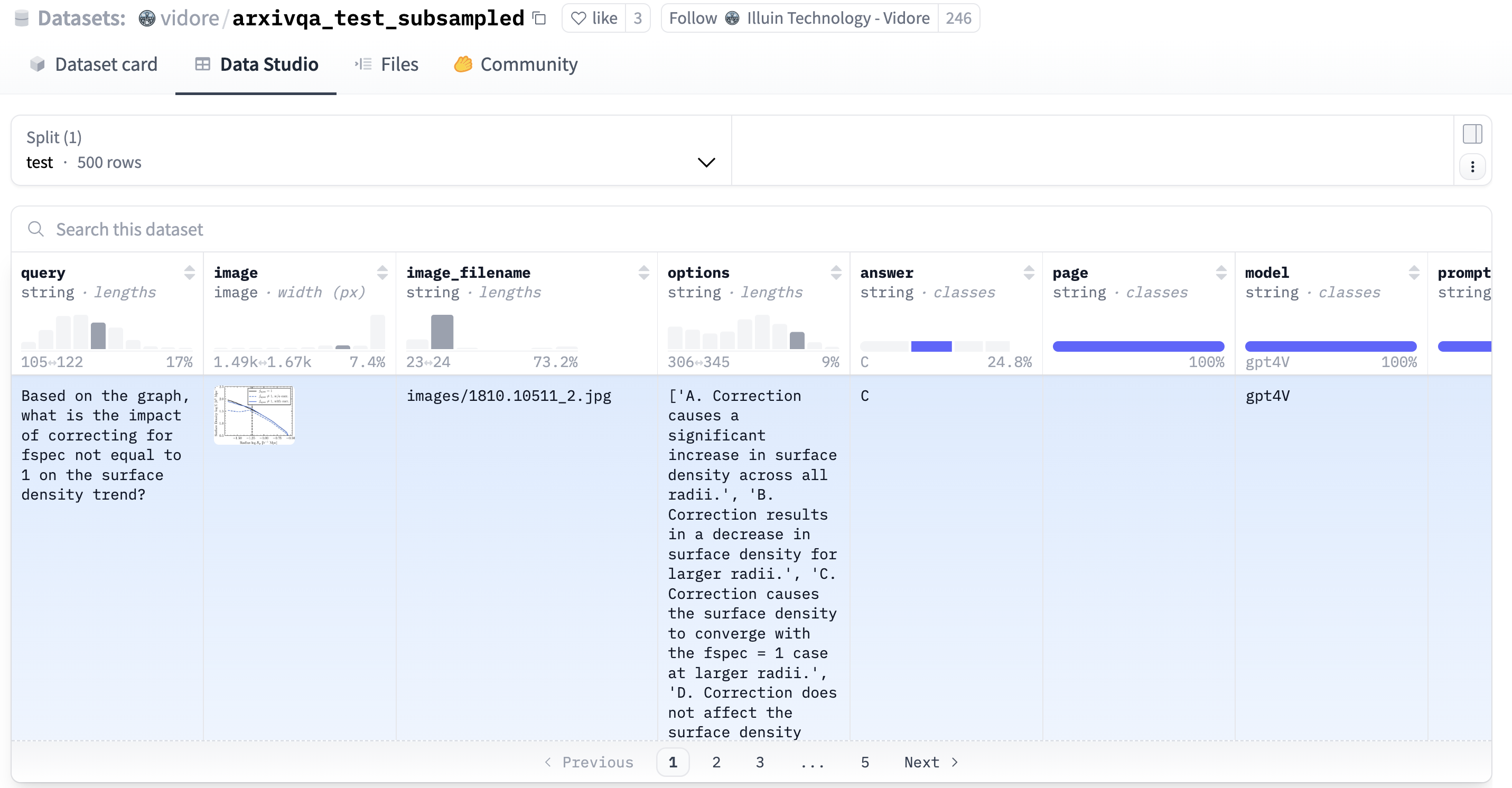
最后一步至关重要:评估检索性能。这套免 OCR 系统能否提供准确的检索结果?速度是否足够快?我们将使用 `vechord` 对已建索引的数据运行查询,并重点考察 NDCG@10 和 Recall@10 指标。同时,我们还将测试 VectorChord 的 **WARP 优化**(用于加速 MaxSim 计算)所带来的性能影响。在本教程中,我们将使用 [vidore/arxivqa\_test\_subsampled](https://huggingface.co/datasets/vidore/arxivqa_test_subsampled) 数据集作为评估查询,数据示例如下图所示:
 ```python
TOP_K = 10
# Define structure for results (optional but good practice)
class Evaluation(msgspec.Struct):
map: float
ndcg: float
recall: float
TOP_K = 10
def evaluate(queries: list[Image], probes: int, max_maxsim_tuples: int) -> list[Evaluation]:
result = []
for query in queries:
vector = query.query_embedding
docs: list[Image] = vr.search_by_multivec(
Image, vector, topk=TOP_K, probe=probes, max_maxsim_tuples=max_maxsim_tuples
)
score = BaseEvaluator.evaluate_one(query.uid, [doc.uid for doc in docs])
result.append(Evaluation(
map=score.get("map"),
ndcg=score.get("ndcg"),
recall=score.get(f"recall_{TOP_K}"),
))
return result
if __name__ == "__main__":
# Select some queries from the benchmark dataset stored in the DB
# Example: Get 100 queries from a specific subset
test_queries: list[Image] = vr.select_by(
Image.partial_init(dataset="vidore/arxivqa_test_subsampled"), limit=100
)
# ... optimize the param ...
res: list[Evaluation] = evaluate(queries, probes=probes, maxsim_refine=maxsim_refine)
print("ndcg@10", sum(r.ndcg for r in res) / len(res))
print("recall@10", sum(r.recall for r in res) / len(res))
print(f"Total execution time: {total_time:.4f} seconds")
```
运行评估脚本后,我们得到了令人印象深刻的结果:
```markdown
# Disable WARP
ndcg@10 0.8615
recall@10 0.92
Total execution time: 810 seconds # Baseline accuracy and time
# Enable WARP
# There is no need to focus on specific times,
# only relative times need to be taken into account,
# as the tests were performed on a local model with poor performance.
ndcg@10 0.8353
recall@10 0.90
Total execution time: 41 seconds # Dramatic WARP Speed Boost
```
**结果分析:**
* **极高的基线准确率:** 首先来看未启用 WARP 优化时的基线表现。系统取得了 **0.8615** 的优异 NDCG@10 和 **0.92** 的 Recall@10。这证实了 ColQwen2 嵌入结合 VectorChord 精确 MaxSim 检索的核心有效性——*即使不启用*速度优化,也能在视觉文档检索任务上取得业界领先的效果。
* **WARP 带来的显著加速:** 接下来观察启用 VectorChord **WARP 优化**后的效果。总执行时间从 810 秒骤降至仅需 **41 秒**!这意味着在评估查询集上实现了高达 **约 18.7 倍的加速**。这充分证明了 WARP 在加速 ColQwen2 等晚期交互模型所需的计算密集型 MaxSim 运算方面的强大能力。
* **微乎其微的精度折衷:** 令人赞叹的是,如此巨大的速度提升仅以极小的检索精度下降为代价。NDCG@10 仅微降至 **0.8353**(差距不到 0.03),而 Recall@10 仅轻微下降至 **0.90**(差距仅为 0.02)。
## 总结:在 Postgres 中让视觉 RAG 更简单 {#conclusion-visual-rag-made-simpler-in-postgres}
在本教程中,我们通过结合 **ColQwen2** 的视觉理解能力、**PostgreSQL** 中 **VectorChord** 的可扩展多向量检索能力,以及 **Modal** 的高效 GPU 处理能力,成功构建了一套高性能的**免 OCR RAG 系统**。我们看到了这一技术栈如何让我们能够直接基于视觉内容检索文档,从而绕过传统 OCR 流水线的重重陷阱。
将这一视觉维度直接无缝集成到 Postgres 内部的 RAG 系统中,为处理富含视觉信息的文档应用(如科研论文、发票单据、产品手册、历史档案等)打开了令人振奋的全新可能。
准备好亲自尝试了吗?
* **探索源码:** [https://github.com/xieydd/vectorchord-colqwen2](https://github.com/xieydd/vectorchord-colqwen2)
* **深入了解 VectorChord:** 查阅 [**VectorChord 文档**](/zh/) 或体验省心的托管服务 [**VectorChord Cloud**](/zh/cloud/)。
* **动手实验:** 尝试接入不同的视觉语言模型(VLM)或数据集。
* **分享您的想法:** 欢迎与我们交流您的使用体验或任何问题!
这一方案向着更简洁、更稳健且具备视觉感知能力的文档检索系统迈出了重要一步。
## 参考资料 {#references}
* [https://huggingface.co/vidore/colqwen2-v1.0](https://huggingface.co/vidore/colqwen2-v1.0)
* [https://huggingface.co/blog/manu/colpali](https://huggingface.co/blog/manu/colpali)
* [https://blog.vespa.ai/scaling-colpali-to-billions/](https://blog.vespa.ai/scaling-colpali-to-billions/)
---
反链:
- [应用案例](/zh/docs/vchord/use-case/)